
IR Remote3.0 - App Store
You'll be able to see results in few seconds.
Publisher Description
IR Remote Power Control Application
In turn this ingeniously simple app, and a little DIY hardware, which consists of just one jack and an infrared diode, your iPhone or iPod Touch into a remote control. With this remote control to controlling up to four commercially available IR power sockets. At these outlets, you can connect any electrical equipment, i.e. lights, TV, motors, coffee machine, Christmas lights, outdoor lighting, heaters or computer equipment and comfortably off your iPhone on and off. And by the way, you save electricity and money, because these outlets are true "standby killers" The IR sockets, you will receive in regular online stores (ebay, Amazon, Pearl, etc.) the term "remote-controlled socket with adaptive infrared sensor. Especially recommended are the products of "revolt", it is available at prices around 15 euros. Some manufacturers also offer intelligent power strips with this IR remote control receivers.
But now to the application: To run the app you need an IR adapter. This may be the simplest way to build your own by simply arrange a convenient 3.5mm stereo jack plug and the two "hot" connections (between left and right channel) IR LED connected with a 27ohm resistor. This connector is then simply plugged into the headphone jack of your iPod or iPhone.
Now start the app "IR remote". You will receive an information message, which you points out once again to connect the IR adapter, because without adapter rings an unpleasant sound from the built-in speakers. Now turn the volume of iPhone / iPod to maximum, so that you achieve the maximum possible output power for the IR diode.
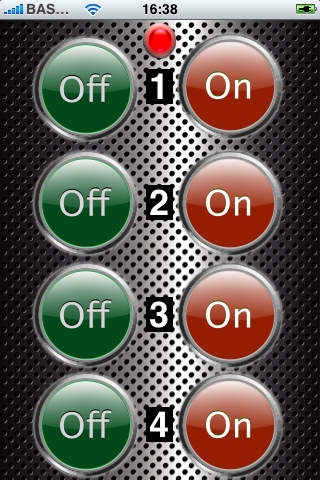
Confirm the message with the "OK" button. There are now a total of 8 buttons, 4 on the power of up to 4 sockets and IR-4 to the shutdown. When you press a key, please contact the iphone a feedback on the red LED and built-in vibration sensor (not the iPod Touch because of) has no such actor. As soon as you release the button for the selected channel, the IR adapter driven with an AC signal. This signal is different for each key, because this signal, the IR socket is trained only once, and later also appear. Please read the instructions that come with the socket. The guide is then by a TV remote control to talk to you then is the Remote Control your iPhone or iPod.
For questions we are available at the listed email address you may have.
Yours HMB | TEC Team
Instructions for making the IR adapter (you can also for connection to the adapter www.hmb tec.de-order)
Spitze 1.Ring
^ ..^--------------->|------[27 Ohm]---+
| ... IR-LED .. .|
|----------------------------------------+
required components:
1 piece IR LED 5mm diameter e.g. Infrared Emitting TSUS 5202 CQW13, e.g. CONRAD Item no.: 184,551
1 piece 3.5 mm stereo jack, for example Conrad Item no.: 738,920
1 Each resistor 27 ohms 1/10W (optional)
The polarity of the LED does not need to be respected, since it is operated with AC!
Requires iOS 3.1 or later. Compatible with iPhone, iPad, and iPod touch.
About IR Remote
The company that develops IR Remote is Holger Blümler. The latest version released by its developer is 3.0.
To install IR Remote on your iOS device, just click the green Continue To App button above to start the installation process. The app is listed on our website since 2009-12-19 and was downloaded 0 times. We have already checked if the download link is safe, however for your own protection we recommend that you scan the downloaded app with your antivirus. Your antivirus may detect the IR Remote as malware if the download link is broken.
How to install IR Remote on your iOS device:
- Click on the Continue To App button on our website. This will redirect you to the App Store.
- Once the IR Remote is shown in the iTunes listing of your iOS device, you can start its download and installation. Tap on the GET button to the right of the app to start downloading it.
- If you are not logged-in the iOS appstore app, you'll be prompted for your your Apple ID and/or password.
- After IR Remote is downloaded, you'll see an INSTALL button to the right. Tap on it to start the actual installation of the iOS app.
- Once installation is finished you can tap on the OPEN button to start it. Its icon will also be added to your device home screen.
Program Details
System requirements
Download information
Pricing
Version History
version 3.0
posted on 2009-12-19
Disclaimer
Official App Store Link
We do not host IR Remote on our servers. We did not scan it for viruses, adware, spyware or other type of malware. This app is hosted by Apple and passed their terms and conditions to be listed there. We recommend caution when installing it.
The App Store link for IR Remote is provided to you by apps112.com without any warranties, representations or guarantees of any kind, so access it at your own risk.
If you have questions regarding this particular app contact the publisher directly. For questions about the functionalities of apps112.com contact us.
